Mastering SharePoint 2019: Complete Course Overview & Tutorials
عدد الدروس : 7 عدد ساعات الدورة : 00:27:53 شهادة معتمدة : نعم التسجيل في الدورة للحصول على شهادةللحصول على شهادة
- 1- التسجيل
- 2- مشاهدة الكورس كاملا
- 3- متابعة نسبة اكتمال الكورس تدريجيا
- 4- بعد الانتهاء تظهر الشهادة في الملف الشخصي الخاص بك
قائمة الدروس
عن الدورة
The Mastering SharePoint 2019 course by PacktPub provides a detailed walkthrough of SharePoint 2019 features and best practices. This beginner-to-advanced series begins with an overview of the course structure and key learning outcomes. Learn how to implement effective branding strategies in SharePoint to create visually appealing and consistent intranet sites. Understand the differences between document libraries and OneDrive to manage files efficiently.
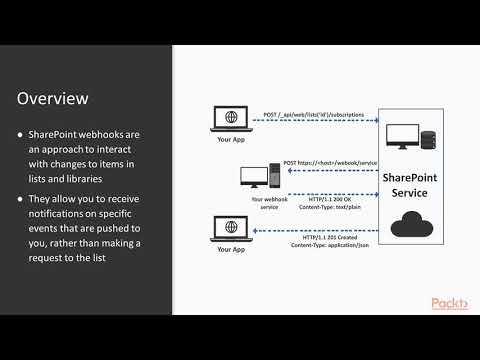
Explore SharePoint’s search capabilities, including indexing, queries, and optimization for user-friendly navigation. Gain practical knowledge about webhooks to automate notifications and integrate external systems seamlessly. Dive into SharePoint Add-Ins and the SharePoint Framework to extend functionality and customize your environment. Additionally, discover how PowerApps and Flow (now Power Automate) can streamline workflows, automate repetitive tasks, and improve productivity.
By following this series, IT professionals, administrators, and developers will gain the skills to design, configure, and manage modern SharePoint 2019 environments. The course provides actionable guidance to enhance collaboration, automate processes, and deliver an optimized SharePoint experience for your organization.